


The Vaayu Handbook
Vaayu by Sapybase is a business-intelligence chat assistant that lives on your website. It answers your customers 24/7, captures and scores every lead, and turns conversations into revenue you can measure. This guide walks you through everything — step by step, no technical knowledge required.
What is Vaayu?
Think of Vaayu as a tireless team member who knows your business by heart. You feed it your content — brochures, FAQs, your website — and it instantly becomes a smart assistant that chats with visitors, answers their questions accurately, and quietly does the work of a sales and support team in the background.
Answers 24/7
Replies instantly to every visitor using only your own approved content — no made-up answers.
Captures & scores leads
Spots interested visitors, collects their details, and ranks them Hot, Warm or Cold by buying intent.
Maps your funnel
Shows how conversations turn into leads, contacts and closed deals — and where people drop off.
Proves ROI
Attributes real revenue back to the chat, so you can see exactly what Vaayu is worth.
The five-minute path to live
- Create your account and pick a plan.
- Create a bot with your company details.
- Paste one line of code on your website.
- Train it on your content and customize the look.
- Watch the leads and insights roll in.
Create your account
Getting started takes under a minute. You only need an email address.
- check_circleSign up with your email or your Google account — whichever is easier.
- check_circleVaayu automatically creates a private, isolated workspace for you, so your data is never mixed with anyone else’s.
- check_circleOnce you’re in, you land on your dashboard — your home base for everything that follows.
Choose your plan
Pick the plan that fits where you are today — you can upgrade or downgrade at any time. Higher plans unlock more bots, more monthly messages, a larger knowledge base, and the full Insights Dashboard.
- boltFree — perfect for trying Vaayu on a single site with a starter message allowance.
- workspace_premiumPro — unlocks automatic lead scoring, the full Insights Dashboard, and revenue attribution.
- hubBusiness — for agencies and larger teams: run multiple bots from one workspace.
The My Bots screen
My Bots is the first thing you see after signing in. Every AI assistant you create lives here as a card. At a glance you can see your plan, how many messages and words of knowledge you’ve used, and the status of each bot.
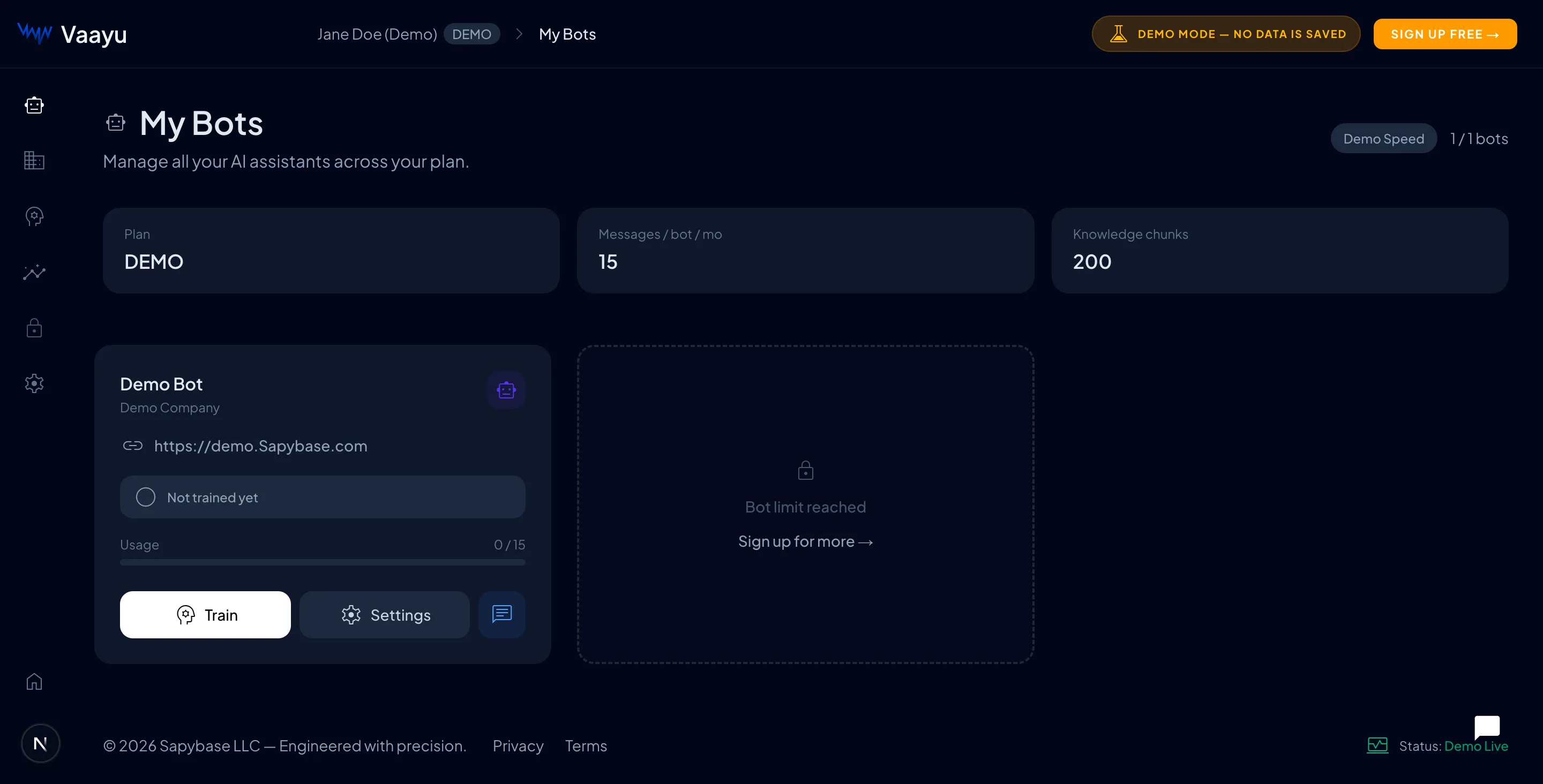
- model_trainingTrain — add or update the knowledge your bot answers from.
- settingsSettings — rename the bot, change its look, or grab the install snippet.
- chatChat — open a live preview to test how your bot replies.
Create a bot
A “bot” is one AI assistant tied to one website. Creating it tells Vaayu who you are and locks the assistant to your domain for security. You’ll fill in a short form — no code involved.
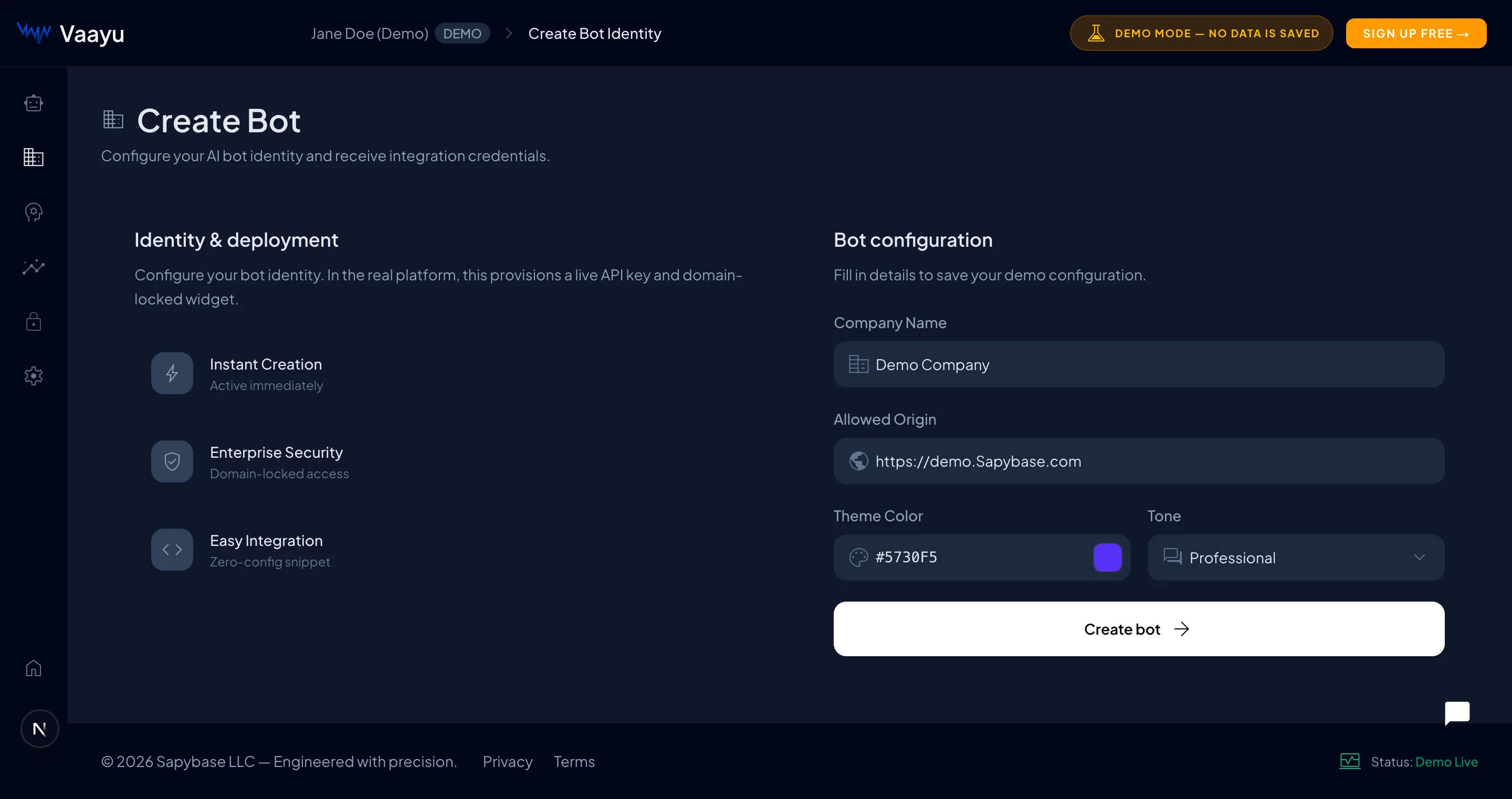
- check_circleCompany name — how your bot refers to your business in conversations.
- check_circleAllowed origin — the website address where the bot is allowed to appear. This keeps your bot from being used on other sites.
- check_circleTheme color — your brand color, used for the chat bubble and buttons.
- check_circleTone — pick how your bot should sound, e.g. professional, friendly or playful.
What you get back
When you create the bot, Vaayu gives you a unique Bot ID and a one-line install snippet. That snippet is all you need to go live — covered next.Install on your website
Adding Vaayu to your site is a copy-and-paste job. You paste one small snippet just before the closing</body> tag on every page. Choose your platform below for exact instructions.
Plain HTML / static websites
Paste this just before </body>:
YOUR_BOT_ID with the Bot ID from your dashboard. Once saved, refresh your site — the chat bubble appears in the corner automatically. Changes you make later in the dashboard go live instantly, with no need to touch this code again.Security: Content Security Policy
Content-Security-Policy header — a stricter security setting some developers add.If you do use a CSP, add Sapybase to the following rules so the widget can load and connect. Extend your existing policy — don’t replace it.
Next.js — next.config.mjs
Train your AI
Training is how your bot learns about your business. The more relevant content you give it, the smarter and more accurate its answers become. Vaayu only ever answers from the material you provide — it won’t invent facts.
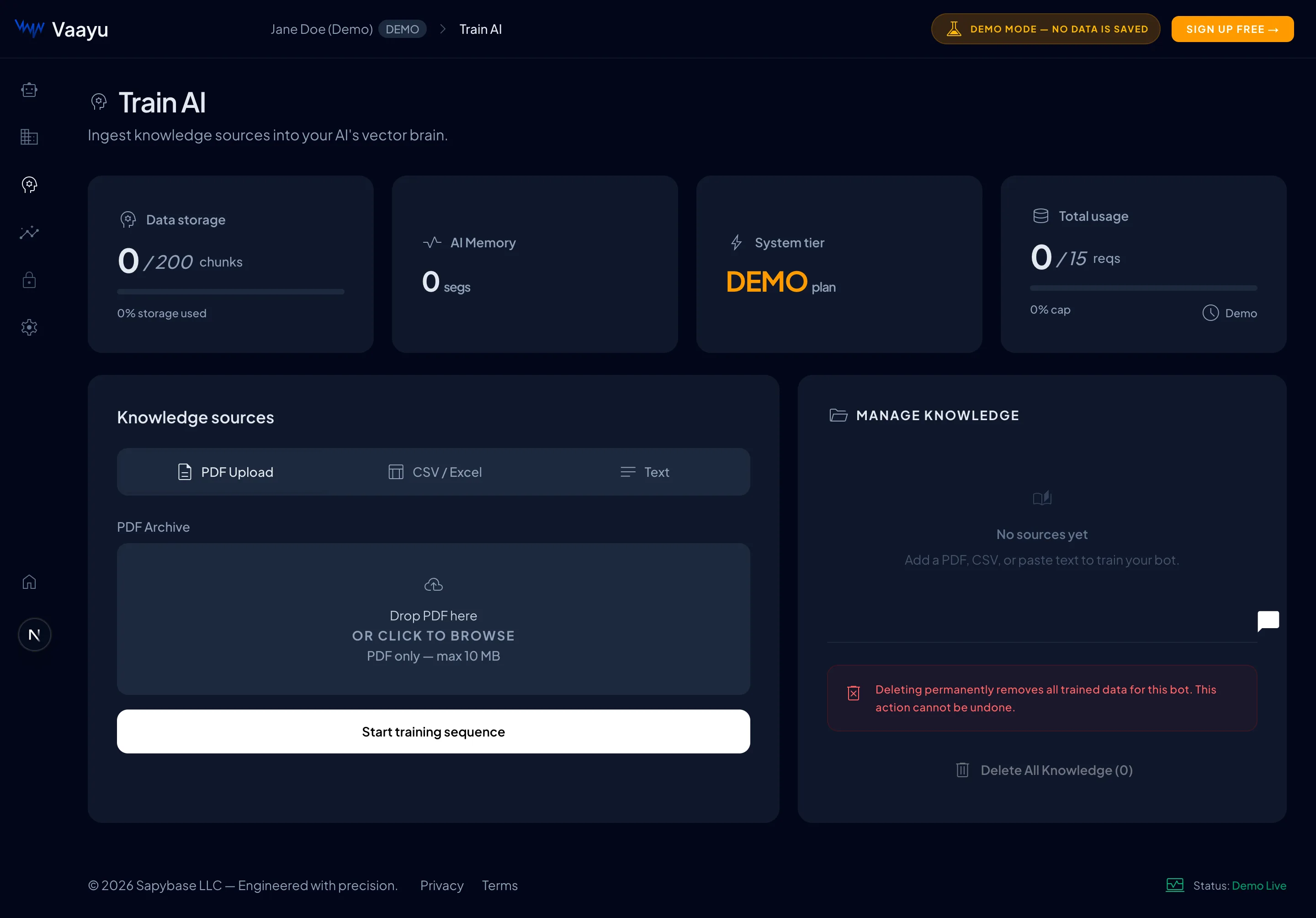
- descriptionPDF upload — drop in brochures, manuals, policies or FAQs. Vaayu reads every page.
- table_chartCSV / Excel — great for product lists, price tables or structured data.
- notesText — paste answers, talking points, or anything else directly.
How knowledge is stored
Each source is indexed and stored as searchable knowledge (measured in words). When a visitor asks something, Vaayu finds the most relevant content and answers from it. You can review and delete entries any time from the knowledge manager.Customize the widget
Make the chat feel like a natural part of your brand. Everything here updates the live preview as you type, and once saved it appears on your website instantly — no redeploy needed.
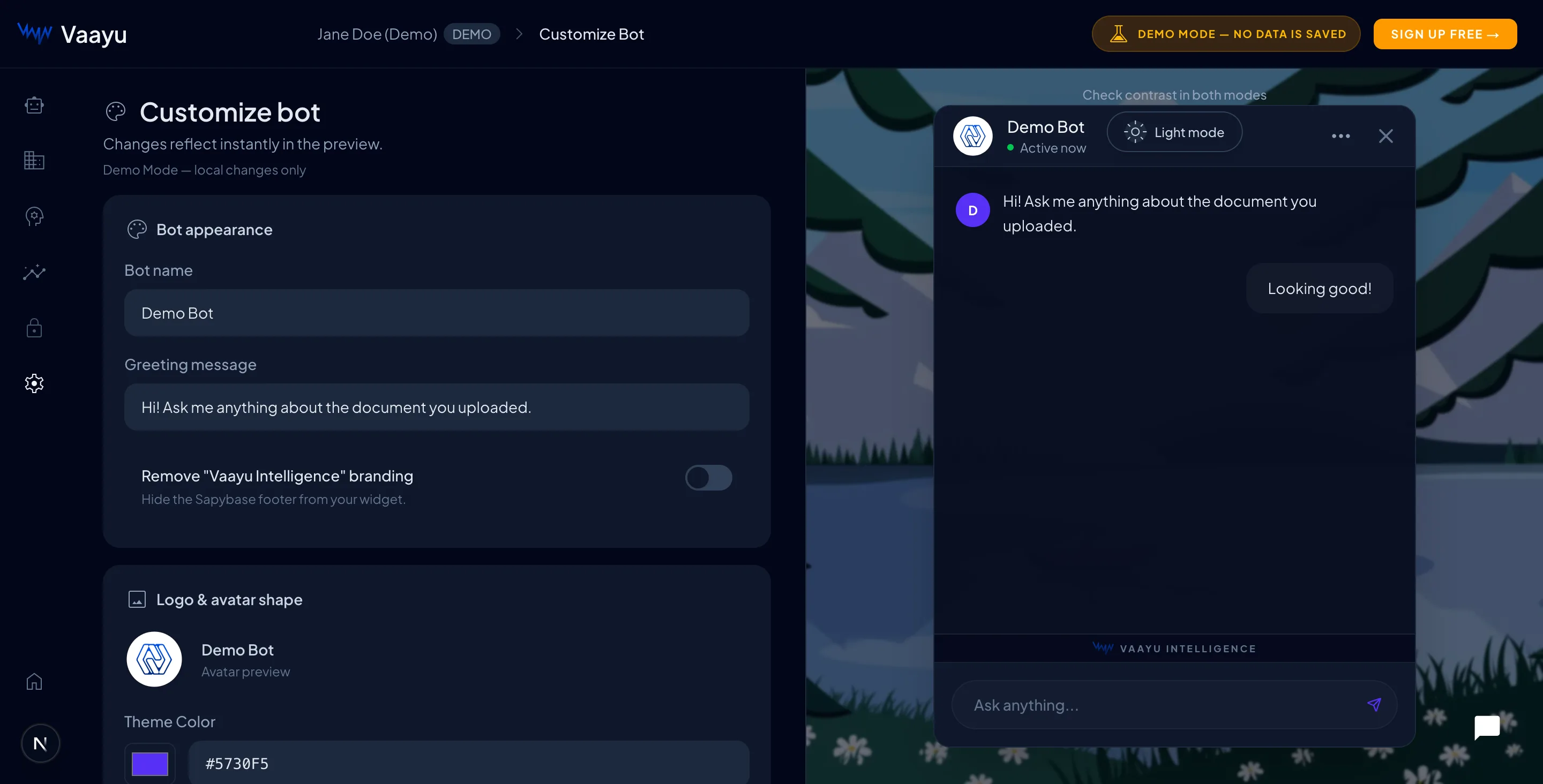
- check_circleBot name & greeting — the first message visitors see when they open the chat.
- check_circleTheme color — match the bubble and buttons to your brand.
- check_circleLogo & avatar shape — upload your logo and choose a shape (circle, squircle, and more).
- check_circleRemove branding — on paid plans, hide the “Vaayu Intelligence” footer for a fully white-label widget.
Insights Dashboard
This is where Vaayu goes beyond a normal chatbot. Every conversation becomes data you can act on. The dashboard is organized into tabs — we’ll walk through each one. The first tab, Action Center, is your daily to-do list: the hottest leads, ranked, with one-click actions.
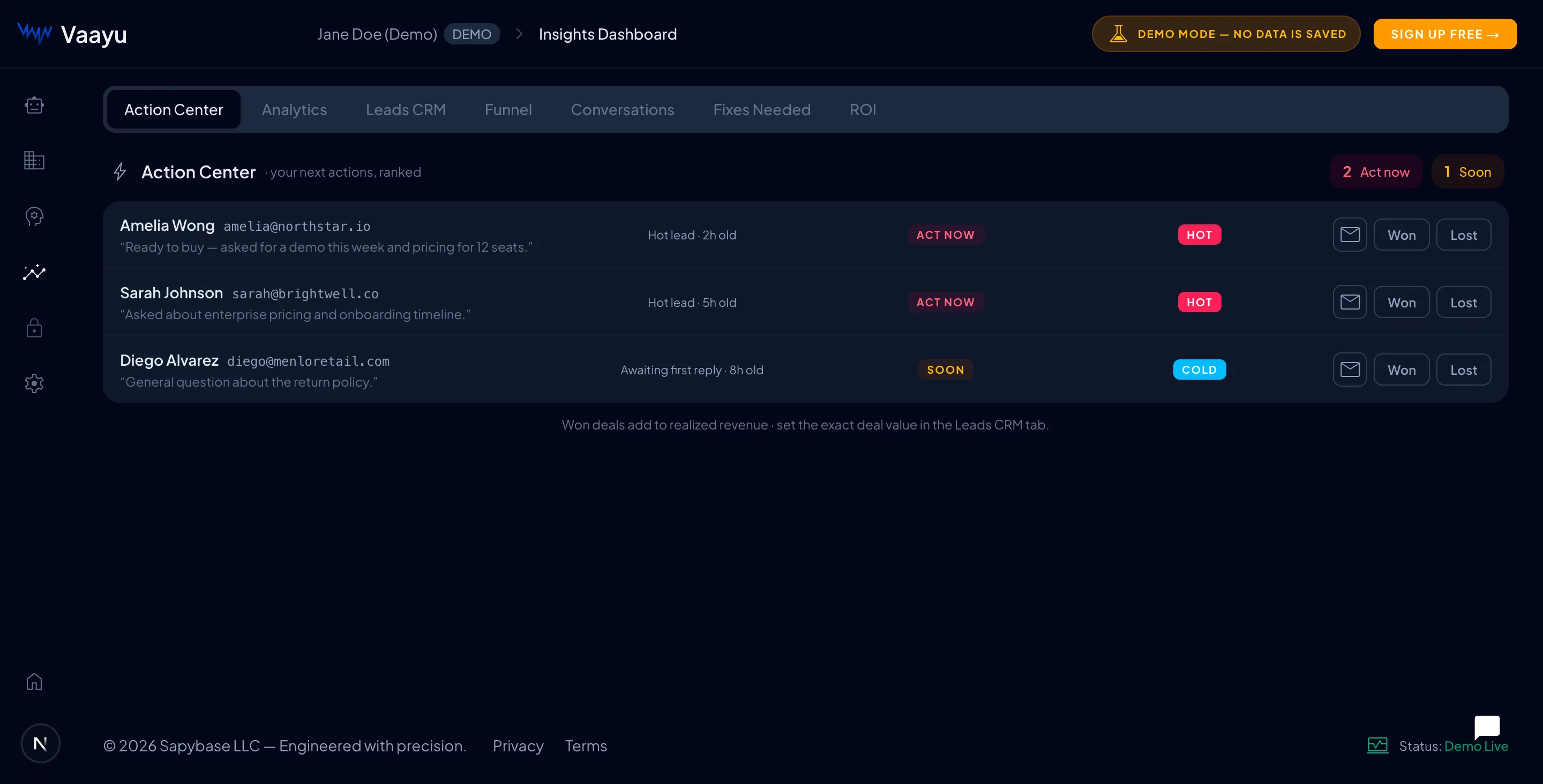
- priority_highRanked actions — the leads most likely to buy float to the top so you act on them first.
- mark_email_readOne-click follow-up — email a lead or mark a deal Won or Lost without leaving the page.
Leads CRM
Every visitor who shows buying interest is captured here automatically, complete with a score and the context of what they asked. No more digging through chat logs — your pipeline builds itself.
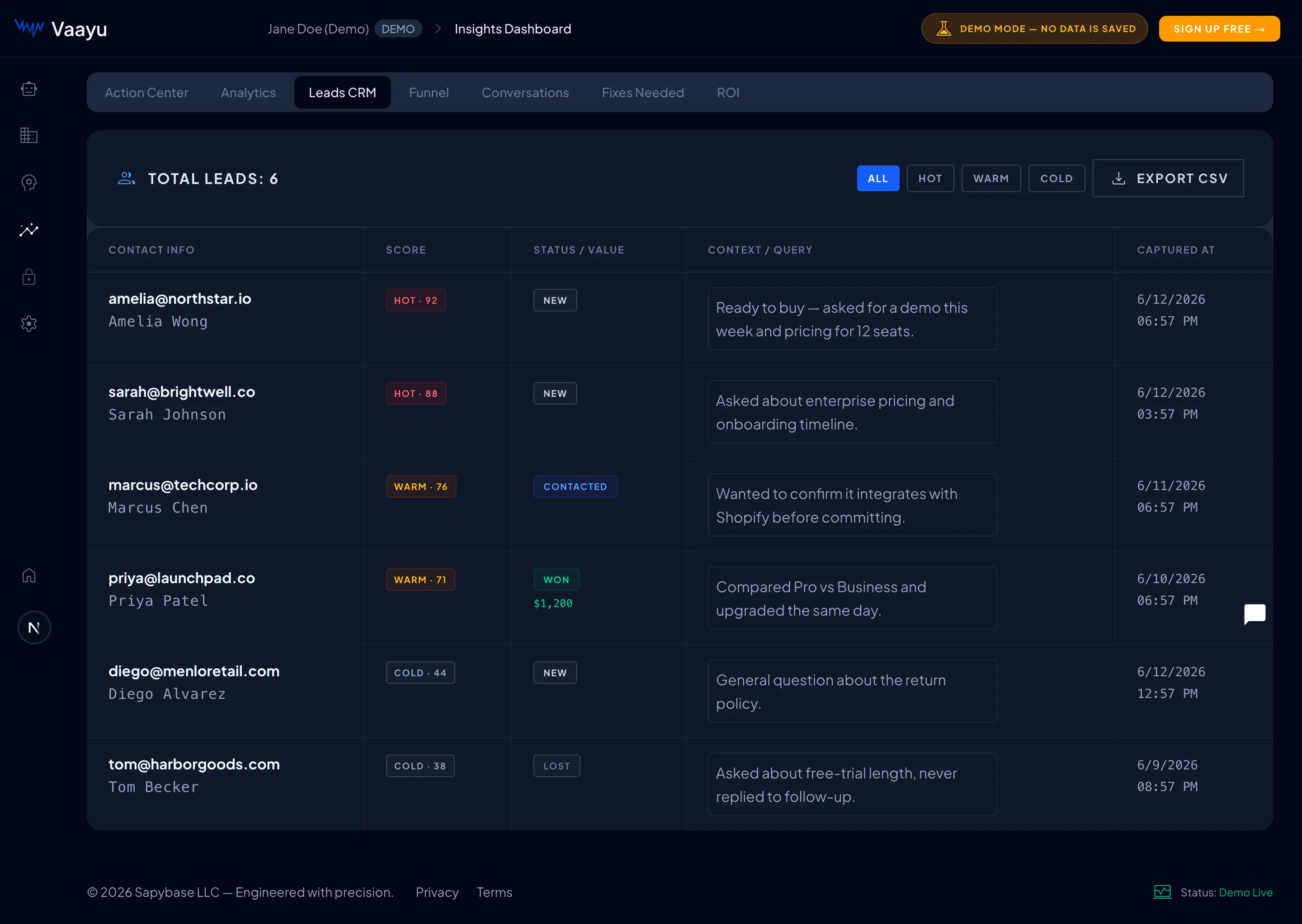
- check_circleIntent score & band — every lead is scored 0–100 and labelled Hot, Warm or Cold.
- check_circleStatus — track each lead through New → Contacted → Won / Lost.
- check_circleContext — see the exact question that turned a visitor into a lead, so your follow-up is relevant.
- downloadExport CSV — pull your leads into any spreadsheet or external CRM.
Conversion Funnel
The funnel shows the journey from a casual conversation all the way to a closed deal, and exactly where people drop off. It’s the fastest way to understand what’s working and what to fix.
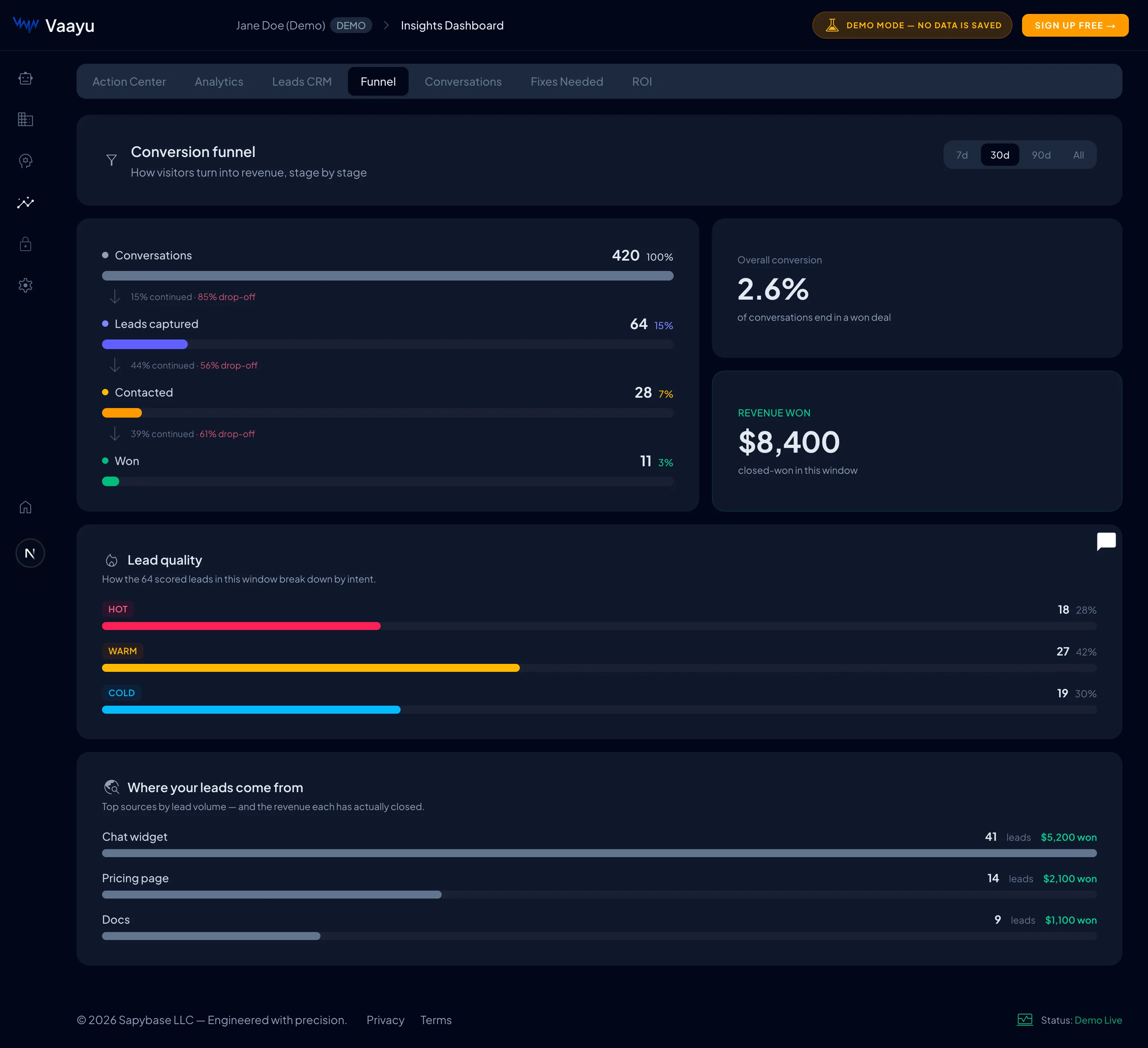
- check_circleStage-by-stage drop-off — see what percentage continues from one stage to the next.
- check_circleOverall conversion & revenue — the headline numbers for the period you choose (7, 30, 90 days, or all time).
- check_circleLead quality — the Hot / Warm / Cold split of your captured leads.
- check_circleLead sources — which pages (chat widget, pricing, docs…) bring the most leads and revenue.
ROI & Revenue
This tab answers the question every owner asks: “Is it worth it?” Vaayu adds up the support time it saves and the revenue it helps generate, then shows your return in plain dollars.
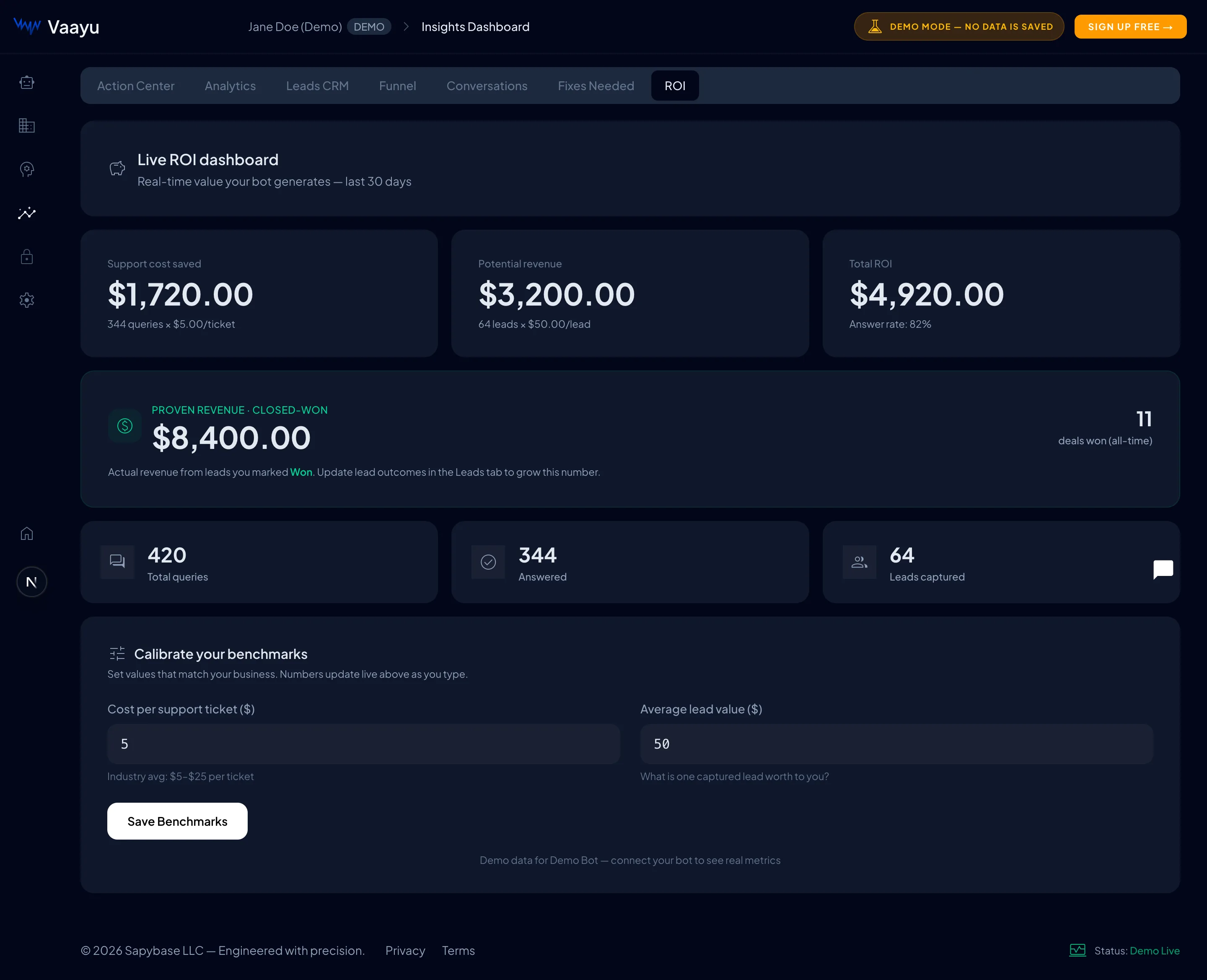
- check_circleSupport cost saved — based on how many questions the bot answered for you.
- check_circlePotential & proven revenue — pipeline value plus the real revenue from leads you marked Won.
- tuneCalibrate benchmarks — set your own cost-per-ticket and average lead value so every figure reflects your business.
Conversations
Read back every chat your visitors had. Vaayu flags conversations where it couldn’t answer well — labelled Has gaps — so you know exactly what content to add next.
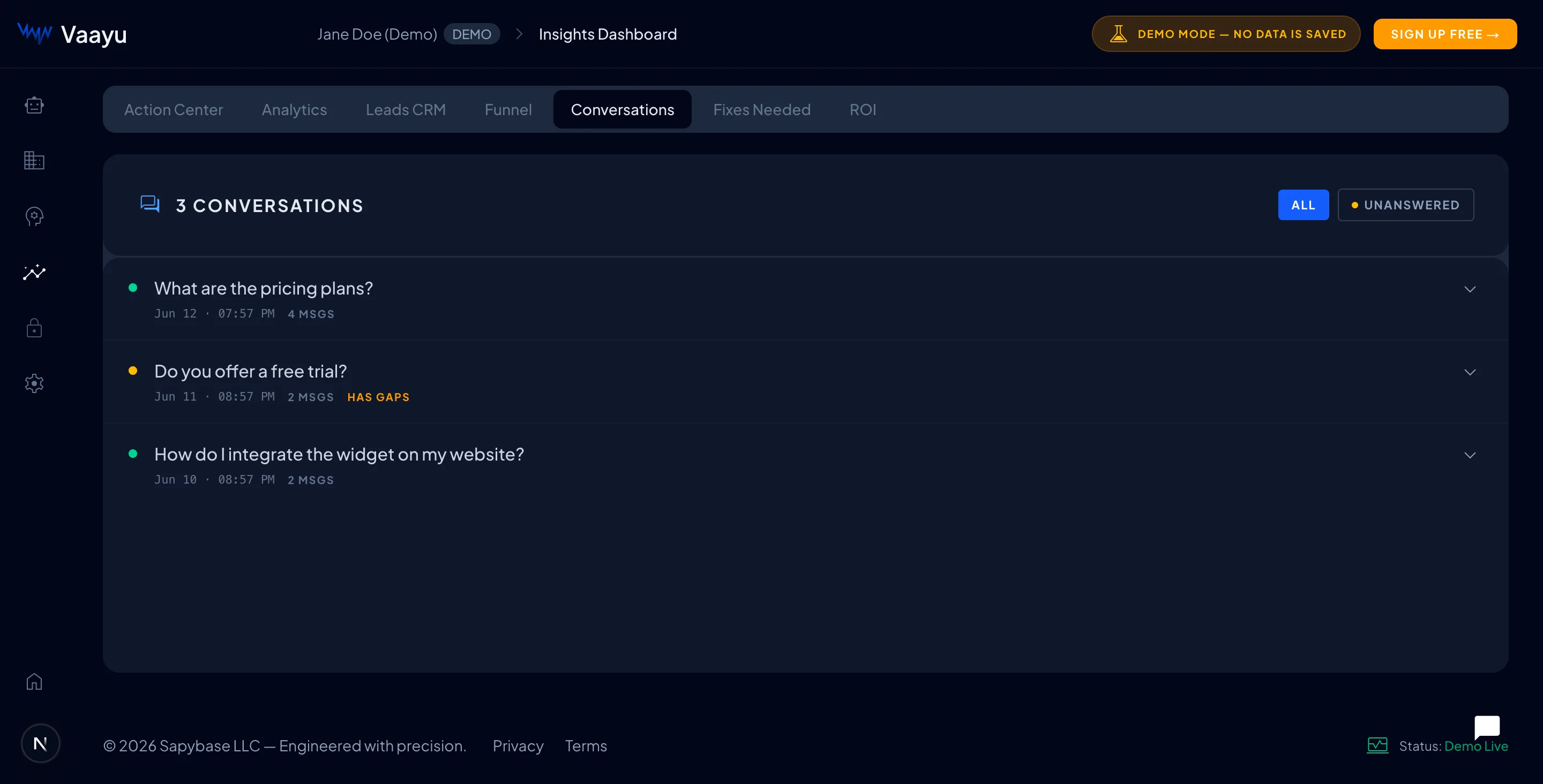
- check_circleFull transcripts — expand any conversation to read the whole exchange.
- filter_listUnanswered filter — jump straight to chats the bot struggled with.
- auto_fix_highClose the loop — add the missing answer in Train AI and the gap disappears.
Analytics
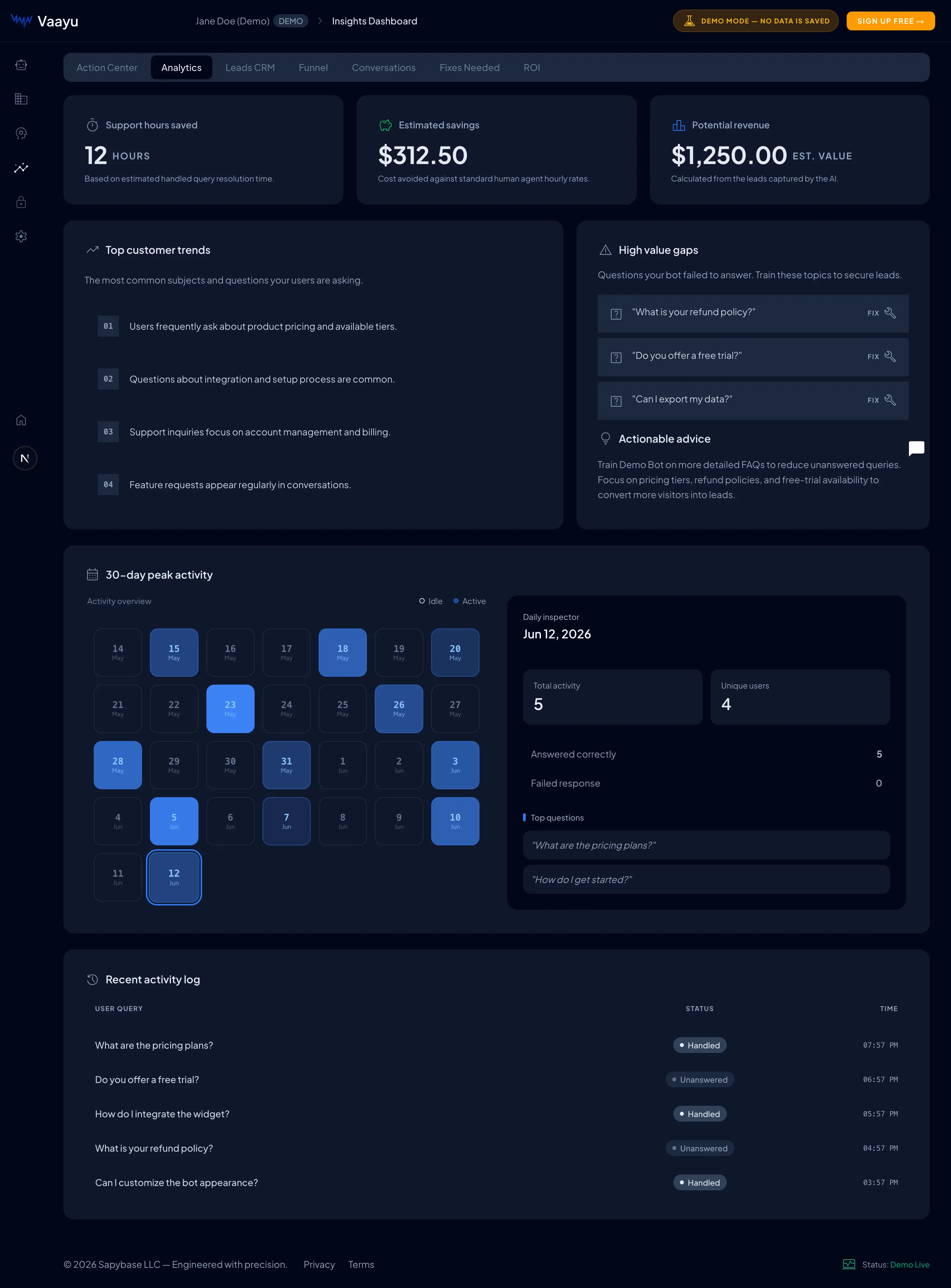
A bird’s-eye view of trends over time — conversation volume, lead flow and the questions customers ask most. Use it to spot patterns and decide where to focus.
Bring Your Own Database (BYOD)
On the BYOD plan, Vaayu runs on top of your own PostgreSQL database instead of ours. Your knowledge, conversations and captured leads are stored entirely in your infrastructure — Supabase, Amazon RDS, Google Cloud SQL, Azure, or a self-hosted server. You give us a connection string; we validate it, set up the schema, and connect. The connection is encrypted at rest and only ever shown masked.
Your data stays yours
Embeddings, chats and leads live in your database — full data residency and compliance control.
Encrypted & masked
Your connection string is stored encrypted and only ever displayed masked — never in plain text.
We provision it
After you submit, our team creates the required tables and pgvector schema in your database for you.
Managed safely
Once live, changes are admin-run so there’s no downtime — and leaving never deletes your data.
Where to find it
Once your account is on the BYOD plan, a My Database item appears in your dashboard sidebar (/dashboard/database). Don’t see it? Talk to us about BYOD to enable the plan.Prepare your database
Before you connect, get your PostgreSQL database ready. The exact values — egress IPs to allowlist, the required pgvector version and embedding dimensions — are always shown live at the top of the My Database page under “Before you start.” Use those as the source of truth.
- databaseA PostgreSQL database — Supabase, Amazon RDS, Google Cloud SQL, Azure Database, or self-hosted.
- extensionThe pgvector extension installed (at least the minimum version shown) — this stores your knowledge embeddings.
- lockTLS / SSL enabled — connections must use
sslmode=require. - lanAllowlist our egress IPs — add the IP ranges shown on the page to your database firewall so we can reach it.
- admin_panel_settingsA privileged database user — one able to create tables and extensions, so we can provision the schema.
Screenshot placeholder
/docs/byod-requirements.webpThe Before you start card on the My Database page showing copyable egress IP ranges, a readiness checklist and the connection-string format
Connect & test
Open Dashboard → My Database and paste your PostgreSQL connection string (DSN) into the connection field. It’s a masked password field — what you type is hidden, stored encrypted, and only ever shown masked afterwards.
Connection string format
Screenshot placeholder
/docs/byod-connect.webpThe Connect your database card with a masked connection-string input, a Test connection button and a disabled Submit for review button
Click Test connection. Vaayu runs a live, read-only probe that checks reachability, TLS, the pgvector version and embedding dimensions — and stores nothing. On success you’ll see a green confirmation with the detected host, database, pgvector version and embedding size.
Screenshot placeholder
/docs/byod-test-success.webpA green Connection looks good panel listing the detected host, database name, pgvector version and embedding dimensions
If the test fails
The error tells you exactly what to fix — most often a firewall/allowlist gap, TLS not enabled, a missing pgvector extension, or wrong credentials. Note: editing the connection string clears your previous test result, so re-test after any change before submitting.Submit & go live
A successful test unlocks the Submit for review button. Submitting stores your connection encrypted and sets the status to Pending — our team then reviews and provisions it, creating the required schema in your database. When provisioning finishes, the status flips to Live and your assistant immediately starts reading and writing in your own database.
Screenshot placeholder
/docs/byod-submitted.webpThe Submitted for review confirmation panel shown after submitting the connection
What each status means
- hourglass_topPending — submitted; our team is reviewing your connection.
- buildProvisioning — we’re setting up the schema in your database.
- check_circleLive — connected and serving your assistant.
- sync_problemNeeds reconnect — we couldn’t authenticate; re-enter your connection string to reconnect.
- pause_circleDisabled — the connection is paused; contact support to resume.
Screenshot placeholder
/docs/byod-status-live.webpThe Connection status card in the Live state showing the masked connection, schema version and last health check
Manage your connection
Once your database is Live, the connection is frozen in the UI for safety — you can’t edit the DSN directly. Instead, you make a request and our team handles the change without downtime.
- syncRequest reconnect — use this when credentials rotate or you move hosts. We re-provision and update the status here.
- logoutRequest to leave — we safely move your data back and follow up. Your database is never deleted.
- sync_problemNeeds reconnect — if we ever can’t authenticate, the page lets you re-enter your connection string to reconnect yourself.
Screenshot placeholder
/docs/byod-manage.webpThe Manage your connection panel with Request reconnect and Request to leave buttons
Settings & Billing
Manage your workspace, plan and payment details from Settings. Upgrades take effect immediately, and downgrades apply at the end of your current billing period.
- manage_accountsAccount — update your name, email and workspace details.
- receipt_longBilling — view your plan, change it, and access invoices via the secure checkout.
- paletteCustomize — the same look-and-feel controls covered above, reachable from Settings.
Getting help
Stuck on something, or want a hand getting set up? Our team is one message away and happy to walk you through any step in this guide.
Ready to put Vaayu to work?
Create your bot, paste one line of code, and start turning conversations into measurable revenue.